
QuickProject2.8 - App Store
You'll be able to see results in few seconds.
Publisher Description


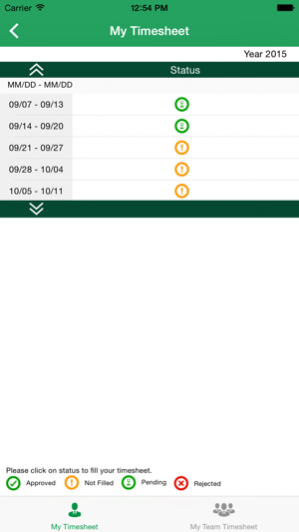
QuickProject app for iOS is designed to help EPM users like project managers, resource managers and team members to view their projects details, assignments, and timesheet status. It is an ideal solution to track project details anytime from anywhere. QuickProject works with both Project Server as well as Project Online accounts. QuickProject addresses two scenarios, first lets you access PWA assignments, projects, timesheet on mobile and second is about submitting timesheet to PWA.
QuickProject gives quick access menu for users to fill the timesheet quickly and submit it for approval. With the built-in easy reminder settings, users can set reminders for tasks. The app also helps organizations to enable the timesheet compliance.
Key Features
* View projects, assignments, milestones by time period
* Track your and project team's timesheet
* Add assignments as Event in Mobile calendar
* Filter Assignments in Timesheet
* Send Progress of all tasks in Timesheet
* Turn in final Timesheet
* Recall Timesheet
* Update Assignment progress using percent complete or actual hours
* Add Existing Task to the Timesheet
* Select your update progress preference.
QuickProject for iOS extends the capabilities of Project Server to your mobile device. QuickProject is a quick and easy way to keep track of your projects and assignments, and perform quick update anytime, anywhere.
NOTE: -
1. Before configuring the app, make sure that you have following permissions granted by PWA admin :
Project Online :
> View Enterprise Resource Data
2. QuickProject for iOS requires an active Project Online account or Project Server On premise. If you are unsure about your account’s status, please contact your IT department.
May 1, 2018 Version 2.8
Bug fixes
About QuickProject
The company that develops QuickProject is ADVAIYA SOLUTIONS PRIVATE LIMITED. The latest version released by its developer is 2.8.
To install QuickProject on your iOS device, just click the green Continue To App button above to start the installation process. The app is listed on our website since 2018-05-01 and was downloaded 0 times. We have already checked if the download link is safe, however for your own protection we recommend that you scan the downloaded app with your antivirus. Your antivirus may detect the QuickProject as malware if the download link is broken.
How to install QuickProject on your iOS device:
- Click on the Continue To App button on our website. This will redirect you to the App Store.
- Once the QuickProject is shown in the iTunes listing of your iOS device, you can start its download and installation. Tap on the GET button to the right of the app to start downloading it.
- If you are not logged-in the iOS appstore app, you'll be prompted for your your Apple ID and/or password.
- After QuickProject is downloaded, you'll see an INSTALL button to the right. Tap on it to start the actual installation of the iOS app.
- Once installation is finished you can tap on the OPEN button to start it. Its icon will also be added to your device home screen.
Program Details
System requirements
Download information
Pricing
Version History
version 2.8
posted on 2018-05-01
May 1, 2018 Version 2.8
Bug fixes
version 1.7
posted on 2015-09-22
Disclaimer
Official App Store Link
We do not host QuickProject on our servers. We did not scan it for viruses, adware, spyware or other type of malware. This app is hosted by Apple and passed their terms and conditions to be listed there. We recommend caution when installing it.
The App Store link for QuickProject is provided to you by apps112.com without any warranties, representations or guarantees of any kind, so access it at your own risk.
If you have questions regarding this particular app contact the publisher directly. For questions about the functionalities of apps112.com contact us.
